QUESTION 30
Your Kubernetes cluster is experiencing a high number of pod restarts in the ‘database-service’ Deployment. The logs show errors related to “connection refused” from the database service. You need to diagnose the issue and resolve it.
See the solution below with Step by Step Explanation.
Explanation:
Solution (Step by Step) :
1. Check the Database Service:
– Verify the database service is running and healthy:
– Use ‘kubectl get services database-service’ to check the service status.
– If the service is not running, try restarting it with ‘kubectl delete service database-service’ followed by ‘kubectl apply -f database-service.yaml’
2. Investigate Network Connectivity:
– Check if pods in the ‘database-service’ Deployment can connect to the database service:
– Use ‘kubectl exec -it -n bash’ to enter a pod in the Deployment.
– Run ‘ping database-service’ or ‘telnet database-service to test network connectivity.
– If ping or telnet fails, there might be a network issue between the pods and the database service.
3. Examine Service Configuration:
– Inspect the database service YAML:
– Verify the port mapping in the service definition matches the port that the database service listens on.
– Ensure the service selector matches the labels of the database pods.
– Example:
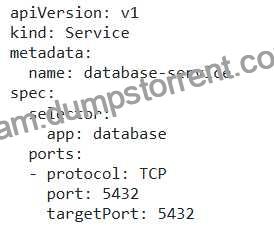
4. Check for Network Policies: – Determine if any network policies are blocking traffic between the database service and the pods: – Use ‘kubectl get networkpolicies -n ‘ to list network policies. – Examine the policies to see if they are blocking traffic based on labels, ports, or other criteria. 5. Troubleshoot Database Service: – Verify the database service itself is running and accessible: – If you can access the database service directly from outside the cluster, but the pods cannot connect, there may be an issue with the database service itself. – Run tests to ensure the database is functioning correctly. 6. Test and Redeploy: – After making changes to the service definition, apply the update: – ‘kubectl apply -f database-service.yaml’ – Monitor the pod restarts. If the issue persists, consider further troubleshooting steps, such as inspecting firewall rules or DNS resolution.